2025-04-20
·Building a World Athletics API with FastAPI and Python
·API Development
·9 min read
Introduction
After successfully parsing the World Athletics Scoring Table PDF(s), I have cleaned and formatted the data, combined the files as necessary, and created a PostgreSQL database with tables to store this data. This article provides an overview of how the API was designed, as well as the schema and tables currently available.
The API is for read only access and the only action permitted is READ. There is no option for users to create or delete data or tables. The following tables can be accessed for information about world athletics scoring.
| table_name                       |
| -------------------------------- |
| WOMEN_HURDLES                    |
| MEN_SPRINTS_PART_I               |
| WOMEN_SPRINTS_PART_I             |
| MEN_SPRINTS_PART_II              |
| WOMEN_SPRINTS_PART_II            |
| MEN_HURDLES                      |
| WOMEN_FIELDS_AND_COMBINED_EVENTS |
| MEN_FIELDS_AND_COMBINED_EVENTS   |
Project Overview
As mentioned in my previous post, the World Athletics Scoring Tables tabular data were successfully parsed for the individual events. The next step involved creating a database and a read-only API that can be used to fetch data for statistical analysis and other software projects.
I have inspected the data and identified the most appropriate data type for each field, and have also converted results recorded in minutes into seconds — for example, converting 1:02.00 to 62 seconds.
After designing the schema and creating each table, the data were loaded into a PostgreSQL database. Finally, I used Python to develop an API using the fastapi library.
Data Processing and Cleaning
The initial parsed data were stored in the ./data folder and have the following structure
   .
    ├── LICENSE
    ├── README.md
    ├── data
    │   ├── MENS_JUMPS_THROWS_AND_COMBINED_EVENTS
    │   │   ├── mens_jumps_throws_and_combined_events_page_368_table_0.json
    │   │   ├── mens_jumps_throws_and_combined_events_page_371_table_0.json
    │   │   └── ...
    │   ├── MENs_Hurdles
    │   │   ├── mens_hurdles_page_68_table_0.json
    │   │   ├── mens_hurdles_page_69_table_0.json
    │   │   ├── ...
    │   │   └──
    │   ├── WOMENs_Hurdles
    │   │   ├── womens_hurdles_page_458_table_0.json
    │   │   ├── womens_hurdles_page_459_table_0.json
    │   │   ├── ...
    │   │   └──
    │   ├── WOMENs_JUMPS_THROWS_AND_COMBINED_EVENTS
    │   │   ├── womens_jumps_throws_and_combined_events_page_758_table_0.json
    ...
Each subfolder contains data for a specific discipline. For example, in the MENs_Sprints_Part_I/ directory, there are .csv files containing a total of 1,400 entries for the fields: Points, 50m, 55m, 60m, 100m, 200m, and 200m sh.
However, the raw data look something like the following:
300m,300m sh,400m,400m sh,500m,500m sh,Points
1300 ,30.54 ,31.14 ,43.31 ,44.19 ,56.85 ,58.03
1299 ,30.55 ,31.15 ,43.33 ,44.21 ,56.87 ,58.05
1298 ,30.56 ,31.16 ,43.34 ,44.22 ,56.89 ,58.06
1297 ,30.57 ,31.17 ,43.35 ,44.23 ,56.91 ,58.08
...
...
55.54 ,56.33 ,1:16.78 ,1:18.34 ,1:41.07 ,1:43.02 ,5
55.72 ,56.51 ,1:17.02 ,1:18.58 ,1:41.38 ,1:43.33 ,4
55.91 ,56.71 ,1:17.28 ,1:18.85 ,1:41.73 ,1:43.69 ,3
56.15 ,56.94 ,1:17.60 ,1:19.17 ,1:42.15 ,1:44.11 ,2
56.46 ,57.25 ,1:18.01 ,1:19.59 ,1:42.69 ,1:44.66 ,1
Using the code below to inspect the dataTypes of each .csv file:
from pathlib import Path
import pandas as pd
import os

# Set the path to folder containing the .csv files
folder = Path('../data_db_source')

# Loop through CSV files
for filename in os.listdir(folder):
    if filename.endswith('.csv'):
        file_path = os.path.join(folder, filename)
        df = pd.read_csv(file_path)

        print(f"\nFile: {filename}")
        print(df.dtypes)
the output is found to be something like the following:
File: MENs_Sprints_Part_II.csv
300m             object
300m sh          object
400m             object
400m sh          object
500m             object
500m sh          object
Points            int64
source_folder    object
source_file      object
dtype: object
Prior to converting each field to a suitable data type for the SQL schema, I combined the .csv files from the same folder and stored them as a single .csv source in the data_db_source directory. This is achieved using the method dataframe.combine(other, func, fill_value, overwrite).
Subsequently, I ensured that any instance of ' - ' was replaced with a NaN value, and any entry containing a colon (':') was identified so that the result for that discipline could be converted from minutes to seconds.
It is worth noting that middle and long-distance scoring tables are not included in this project, therefore entries containing a colon (':') are known to be in minutes, since the longest distance was 500m.
API Design and Implementation
To develop a read-only API, a database was set up using Supabase, with the appropriate schema defining the tables outlined above. Each row contains a unique identifier. The data can be loaded either manually by importing .csv files or via load_db.py script.
In both cases, the relevant tables must already exist, and all required dependencies should be installed.
Installing the SDK
The Supabase SDK can be installed within a virtual environment using the following command:
pip3 install supabaseThe local environment variables in .env were updated with the Supabase credentials and project URL.
The load_db.py script was created, where folder names corresponding to the table names in the database were looped through, and each file was converted into a DataFrame before being inserted in batches for more efficient data insertion.
supabase.table("<TABLE_NAME>").insert(batch).execute()An example of the MEN_SPRINTS_PART_II table and schema can be found below,
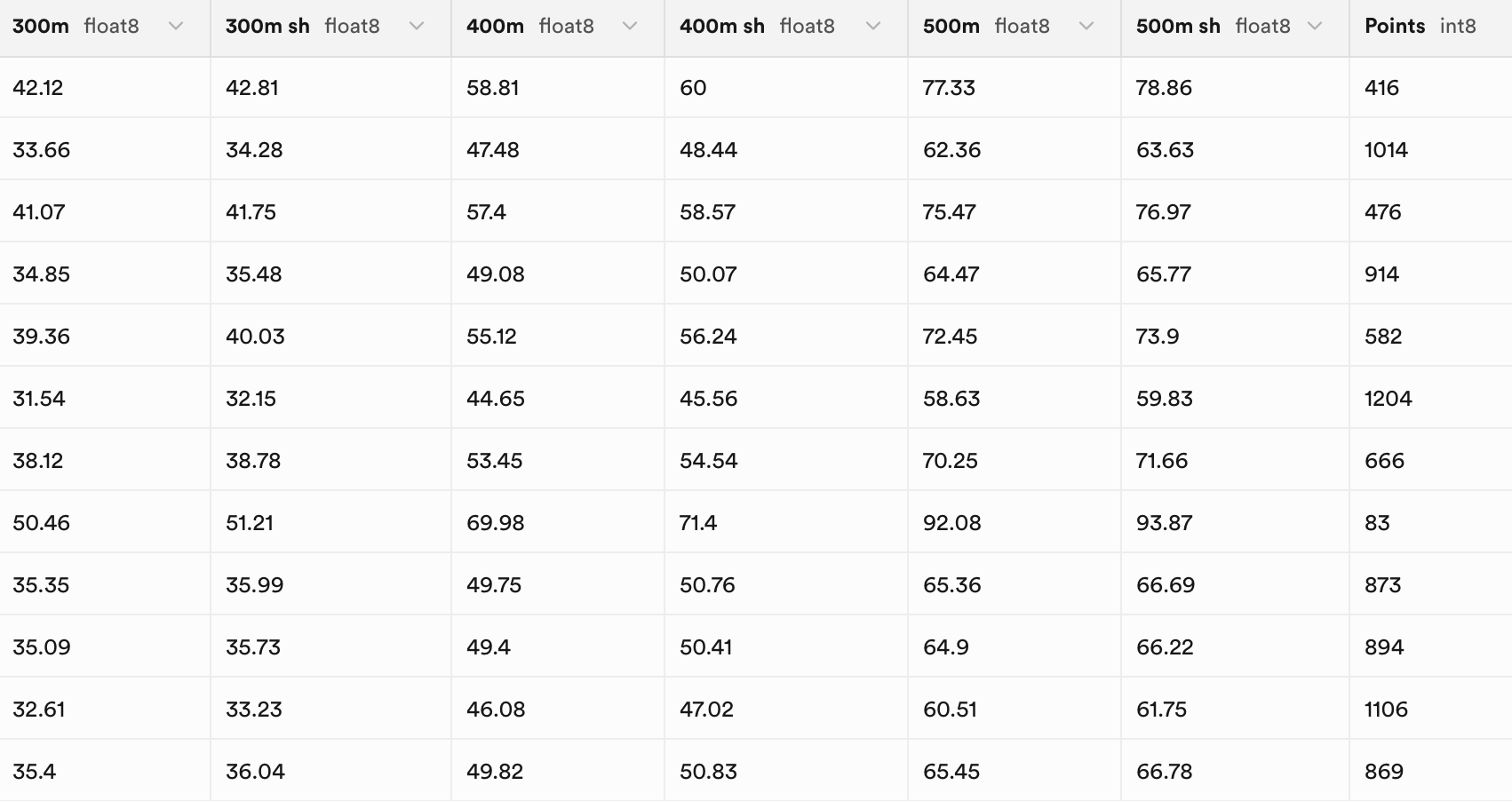
            -- Table: MEN_SPRINTS_PART_II

            Column Name     | Data Type                | Nullable | Default
            ----------------+--------------------------+----------+-------------------
            id              | UUID                     | NO       | gen_random_uuid()
            created_at      | TIMESTAMPTZ              | NO       | now()
            "300m"          | DOUBLE PRECISION         | YES      | null
            "300m sh"       | DOUBLE PRECISION         | YES      | null
            "400m"          | DOUBLE PRECISION         | YES      | null
            "400m sh"       | DOUBLE PRECISION         | YES      | null
            "500m"          | DOUBLE PRECISION         | YES      | null
            "500m sh"       | DOUBLE PRECISION         | YES      | null
            "Points"        | BIGINT                   | YES      | null
            source_file     | TEXT                     | YES      | null
            source_folder   | TEXT                     | YES      | null
API Development
A custom read-only API was developed on top the PostgresSQL using the standard folder structure for app development for FastAPI(s)
The folder is structured in the following way,
└── world-athletics-api
    ├── LICENSE
    ├── README.md
    ├── api
    │   ├── __init__.py
    │   ├── client.py
    │   ├── config.py
    │   ├── main.py
    │   ├── models.py
    │   └── routes.py
    ├── requirements.txt
    ├── scripts
    │   ├── analyse_csv.py
    │   ├── load_db.py
    │   ├── manipulate_csv_field.py
    │   └── merge_data.py
    └── .env
In main.py, FastAPI and the routes are registered. In config.py, the credentials are loaded from the local .env file using the load_dotenv() functionality. client.py connects to the database using the functionalities from config.py. Finally, routes.py provides the API endpoints to carry out read-only transactions in the Supabase database, and models.py defines the structure of the data.
Once this files were ready, the test were achieved by running uvicorn api.main:app --reload with output
INFO:     Started server process [6210]
INFO:     Waiting for application startup.
INFO:     Application startup complete.
By navigating to http://127.0.0.1:8000/redoc or http://127.0.0.1:8000/docs, interaction with the database can be carried out, and it can be verified whether the API is functioning correctly.
INFO:     127.0.0.1:51125 - "GET /docs HTTP/1.1" 200 OK
INFO:     127.0.0.1:51125 - "GET /openapi.json HTTP/1.1" 200 OK
INFO:     127.0.0.1:51126 - "GET /docs HTTP/1.1" 200 OK
INFO:     127.0.0.1:51126 - "GET /openapi.json HTTP/1.1" 200 OK
INFO:     127.0.0.1:51128 - "GET /world-athletics-api/scores/MEN_HURDLES HTTP/1.1" 200 OK
Difficulties
During testing, several errors were displayed on the FastAPI documentation UI, related to the way models.py was defined. A successful response was received; however, a ValidationError occurred. After several iterations, it was decided to remove the model entirely to determine whether the data could be fetched. Additional layers of complexity were then introduced during further testing.
Several things were noted, the table names are case sensitive and were returned correctly when using the following query in the SQL editor
SELECT table_name
FROM information_schema.tables
WHERE table_schema = 'public';
However when querying the following no data was returned
curl -X GET "http://127.0.0.1:8000/scores/MEN_SPRINTS_PART_I?min_points=1300"

{"detail":"Not Found"}%
Resolution
It became claer that the issue was related to the RLS policy settings. The tables were not accessible externally. Additional code was written to allow third parties, such as Postman, to send requests to my endpoint. The women’s and men’s combined jumps events tables were made available to start with.
The filters were not functioning correctly due to syntaxt errors, a min_points and max_points filters were added to route.py using the gte and lte operators.
        # Declaring a query for the table_name provided
        query = client.table(table_name).select("*")
        # Apply points filters is they exists
        if min_points is not None:
            query = query.gte("Points", min_points)

        if max_points is not None:
            query = query.lte("Points", max_points)

        # Execute query to get a response
        response = query.execute()
Finally, the number of requests was limited to 5 per minute using the following configuration:
rate_limit: RateLimiter = Depends(RateLimiter(times=5, seconds=60))Note: Filtering by event is not yet supported.
Testing and Usage
To test the API locally on the terminal one can use:
db world-athletics-api % curl -X GET \
"http://127.0.0.1:8000/world-athletics-api/scores/MEN_SPRINTS_PART_I?min_points=1400" \
  -H "accept: application/json"
The output is
[
  {
    "Points": 1400,
    "id": "31a9d003-d474-4883-af08-2e9d412caa86",
    "source_folder": "MENs_Sprints_Part_I",
    "source_file": "MENs_Sprints_Part_I_page_8_table_0.csv",
    "data": null,
    "created_at": "2025-04-20T18:54:04.036893+00:00",
    "50m": null,
    "55m": null,
    "60m": null,
    "100m": 9.46,
    "200m": null,
    "200m sh": 19.33
  }
]
the other terminal looks like the following
INFO:     127.0.0.1:##### -
"GET /world-athletics-api/scores/MEN_SPRINTS_PART_I?min_points=1386&max_points=1399 HTTP/1.1" 200 OK
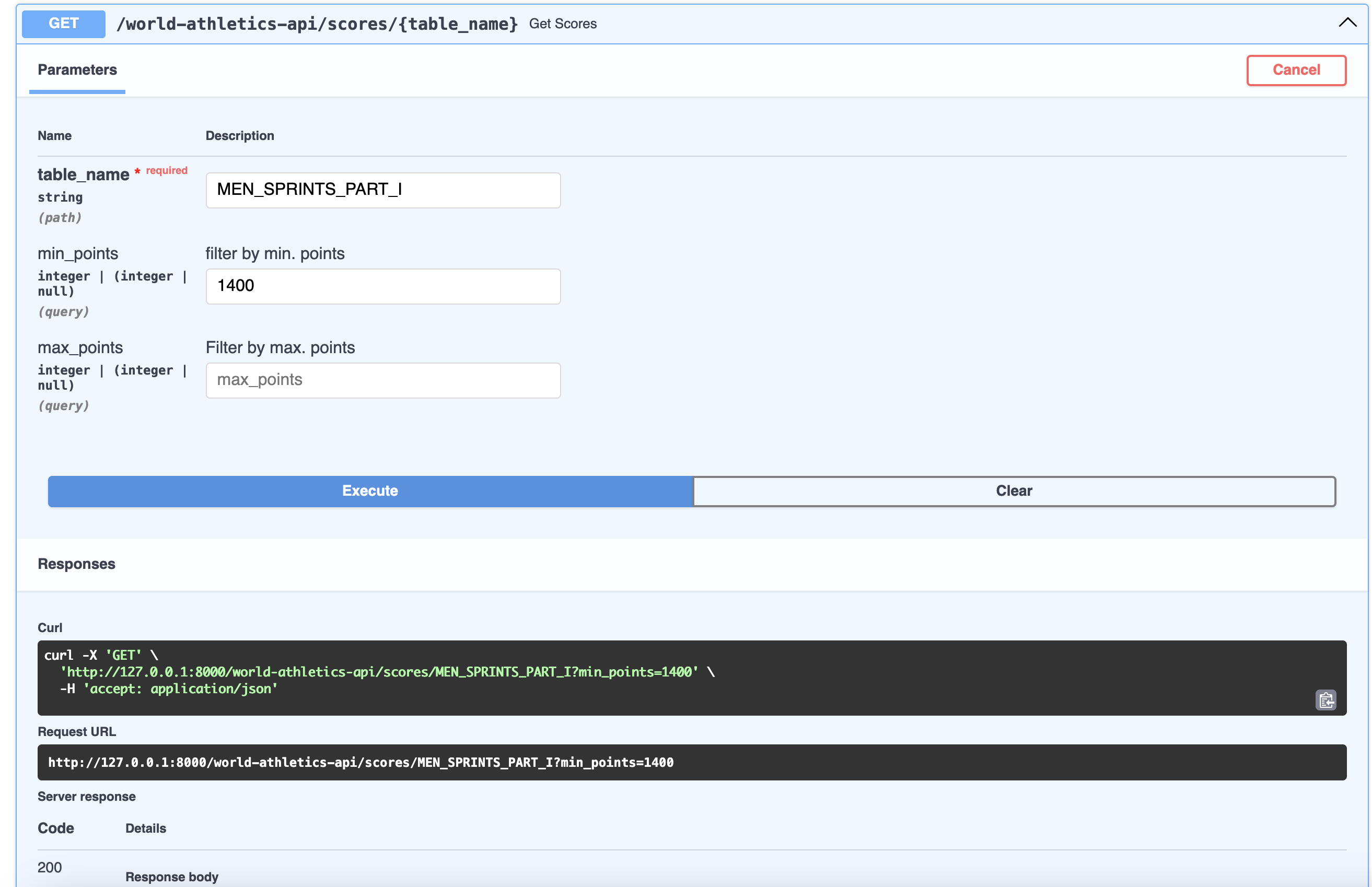
Similarly tests can be done on docs or redoc
Conclusion
This post describes the processes utilised to develop a read-only API to query a World Athletics Scoring Table database, which was created by parsing the World Athletics technical documents recently updated by Attila Spirev [1]. Access to the tables has currently been restricted, as further testing is required. Once the API is production-ready, it will be deployed with additional features. In the meantime, the data will be used locally for statistical analysis, particularly to determine the coefficients for each discipline needed to compute the scoring.
Thank you for reading, and happy Easter.
References
[1] Spiriev, B. and Spiriev, A. (2025) Scoring Tables of Athletics / Tables de Cotation d’Athlétisme: 2025 Revised Edition. Monaco: World Athletics. Available at: https://worldathletics.org/about-iaaf/documents/technical-information (Accessed: 17 April 2025).
Topics
- API development with FastAPI
- PostgreSQL database design
- Data cleaning and type conversion
- Row-level security (RLS) policies
Tech Stack
- FastAPI
- PostgreSQL
- Python
- Pandas